
That dreaded silence from your ice machine during a lunch rush doesn't have to mean a $200 service call. When the steady drop of fresh ice stops, the immediate fear is a costly breakdown, but don't reach for the phone just yet. Many of the most common ice maker problems are surprisingly simple to fix yourself in just a few minutes. This troubleshooting guide helps you diagnose and resolve common issues, getting you back up and running without the wait or the expense.
A significant number of ice maker "failures" aren't mechanical breakdowns at all. Often, the answer to "Why is my commercial ice maker not making ice?" relates to power, water, or a sensor that just needs a quick reset. To save you time and money, this guide is organized like a first-aid checklist, tackling the easiest and most common issues first.
Before assuming the worst, walk through these five quick diagnostic checks. This process will help you rule out the most frequent—and sometimes most embarrassing-to-miss—problems in minutes.
- The 5-Step First-Aid Checklist
- Check the Power Supply
- Check the Water Source
- Check the Ice Bin and Sensor
- Check the Room Temperature
- Check for a Flashing 'Clean' Light
Start with step one; you might solve the problem in less than 60 seconds without needing any tools.
Is It Plugged In? The 60-Second Power Check That Saves a Service Call
It might sound too simple, but the first step is always to verify the basics. Trace the power cord from your commercial ice maker and confirm it’s plugged securely into the wall outlet. Next, locate the machine's main power switch—often a toggle or a lit button—and ensure it's in the “On” position. If a power light comes on, the unit is receiving electricity, and you can move to the next section. If it’s still lifeless, the problem may be the circuit.
A tripped circuit breaker acts as a master safety switch. When a circuit overloads, the breaker trips to cut the power and prevent damage. Find your building’s breaker panel, typically in a back room or utility closet. Look for a switch handle that has shifted to the middle or “Off” position. To reset it, push the switch firmly to “Off,” then flip it back to “On.”
If flipping the breaker brought your machine back to life, you’ve solved the problem. However, if the outlet, switch, and breaker are all working but your commercial ice maker is still not making ice, you've successfully ruled out the power supply. An ice machine needs electricity and water, so let's investigate its other lifeline.
Is the Water Supply Turned On? Checking Your Machine's Lifeline
With power confirmed, check the machine's other essential ingredient: water. Your commercial ice maker is connected to a water supply line, which typically looks like a braided steel hose or a thin plastic tube. This line has its own shut-off valve that controls all water flowing into your machine. If it was accidentally bumped or turned off during cleaning, it's a simple fix.
Find the valve and look at its handle. If the handle runs parallel to the pipe (in the same direction), the water is on. If it’s perpendicular (making a “T” shape), the water is off.
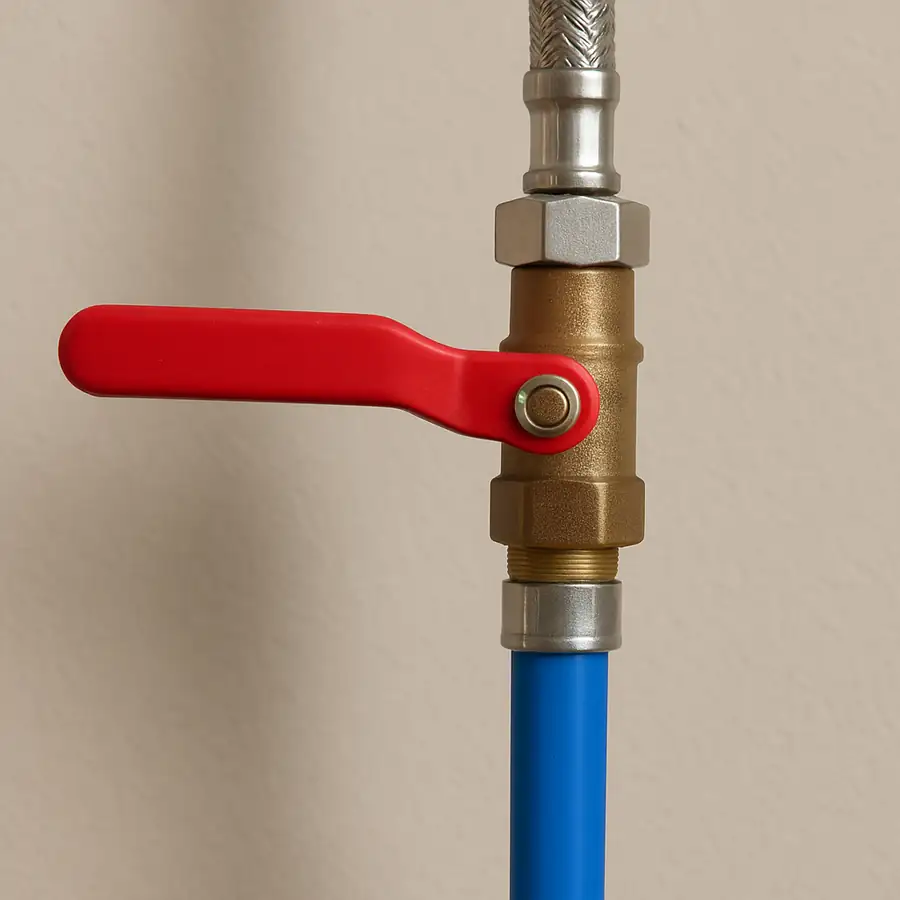
If the valve was closed, turn it parallel and listen. You may hear water begin to flow, signaling that your ice maker not filling with water is likely solved.
If the valve was already open, the problem might be pressure. Common commercial ice maker low water pressure symptoms include ice cubes that are small, thin, or incomplete because the trays don’t fill properly. If you have confirmed both strong power and solid water pressure, the problem may be the environment around your machine.
Is the Room Too Hot? How High Temperatures Stop Ice Production
Even with perfect power and water, an ice machine can shut down if it gets too hot. To make ice, the machine pulls heat out of the water and dumps it into the surrounding air. If your kitchen or storage room is already hot, the machine has nowhere to put that excess heat, leading to a classic case of an ice maker running but not making ice.
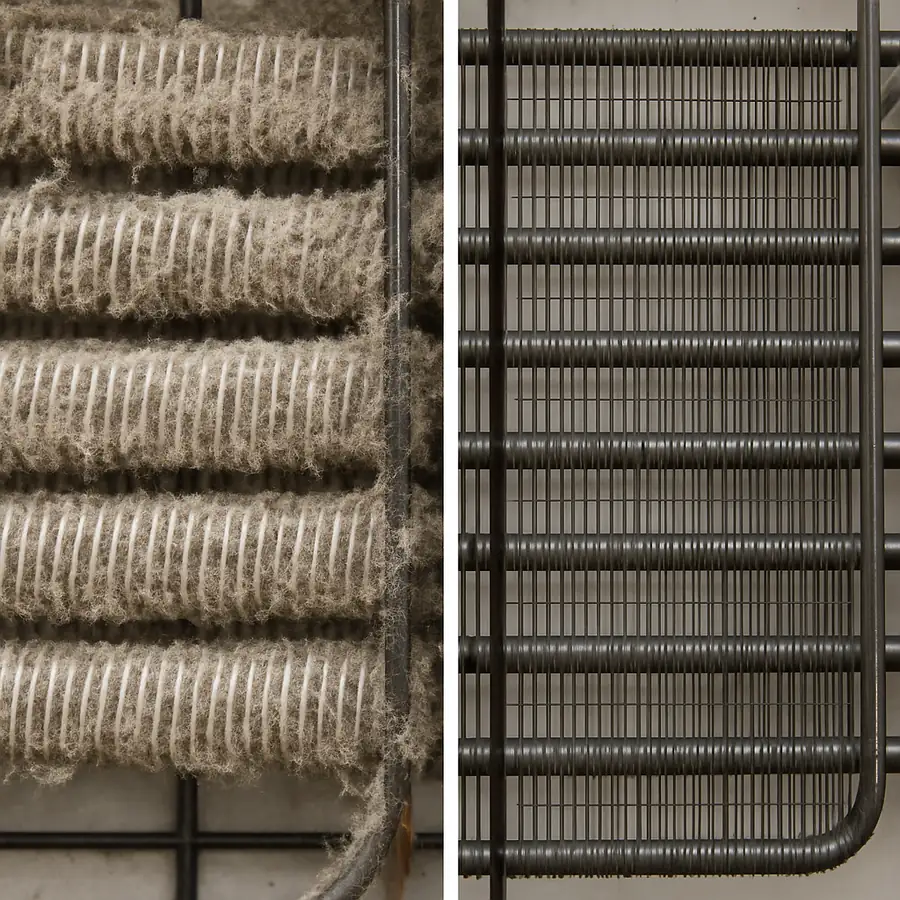
The machine uses a part called the condenser—a grid of metal fins behind a vented panel—to release this heat. Over time, this condenser gets clogged with dust, grease, and lint. When that happens, the machine can't "breathe" and overheats, forcing a protective shutdown. An overworked system can also malfunction in unexpected ways, such as freezing up.
A surprisingly common and easy fix is to clean commercial ice machine condenser coils. Here’s how to do it safely:
- Power Down: For safety, turn off the machine and unplug it.
- Access the Coils: Locate and remove the vented panel, using a screwdriver if necessary.
- Gently Clean: Use a stiff-bristled brush (not a wire brush) to brush debris off the coils in the same direction as the fins. Use a vacuum with a brush attachment to suck up all loosened gunk.
Finally, ensure the machine has at least six inches of open space around any vented panels for proper airflow. Don't store boxes or other equipment right up against it. If the problem isn't heat or water, perhaps the machine simply thinks its job is already done.
Is It Just Full? How a Blocked Sensor Can Trick Your Machine
Sometimes, your ice maker isn't making ice because it thinks its job is done. Inside the ice bin, a shut-off arm (a metal rod) or an electronic eye sensor detects when the bin is full and pauses production. If this arm gets stuck up or the sensor is blocked, the machine will stop making ice to prevent overflowing, even if the bin is nearly empty.
A common issue that fools this sensor is an uneven pile of ice. If fresh cubes build up in a mound directly where they fall, it can push the arm up prematurely, shutting down production. The machine isn't broken; it's just getting a false “full” signal. This is a frequent reason an ice maker not dropping ice from mold occurs—the entire process has been paused.
As a first step, take an ice scoop and level the ice across the bin. Gently check that the shut-off arm moves freely and isn’t frozen place. Often, this quick fix is all that’s needed to signal the machine to start working again. If the bin is low and the sensor is clear but the machine is still stuck, it might trouble with its internal cycles.
Why Is My Machine Stuck? Understanding the Freeze and Harvest Cycles
An ice maker has a two-step job: building ice and releasing it. These are the Freeze Cycle and the Harvest Cycle. If the machine gets stuck in one, the whole process grinds to a halt.
The first step is the Freeze Cycle. During this phase, the compressor hums and water flows over a cold metal grid called the evaporator plate. This is the "building" phase, where layers of water freeze into solid cubes. If your machine is humming and water is moving but no solid ice forms, it's likely struggling with this initial cycle.
Once the cubes are ready, the machine switches to the Harvest Cycle. The purpose of the harvest cycle is to briefly warm the metal plate just enough to release the cubes and let them fall into the bin. A failure here is the most common reason for an ice maker not dropping ice from the mold. You will see a full sheet of perfect ice stuck to the grid that simply refuses to fall.
If you see a full sheet of ice that won't drop, the machine is stuck in its harvest cycle, which can cause an ice machine freezing up fix. A simple power cycle can often jolt the machine’s internal computer out of this loop.
How to Safely Reset Your Commercial Ice Maker
Like a frozen computer, your ice maker’s internal control board can get stuck in a logic loop. This electronic glitch can mimic serious issues, from ice machine thermostat problems to flashing Manitowoc ice maker diagnostic codes. A full power cycle—a hard reset—can clear these temporary errors and give the machine a fresh start.
Follow this universal process for how to reset a commercial ice maker, which forces the internal components to power down and clear confused signals from memory.
- Press and hold the 'Off' button until the machine shuts down completely.
- Unplug the ice maker from the wall outlet. Wait for at least five minutes to ensure all capacitors discharge.
- Plug the unit back in and press the 'On' button.
Once powered on, you should hear the startup sequence begin within a minute or two, usually with the sound of a fan and then the water pump. This indicates a successful reset. Give it at least 30-45 minutes to see if it completes a cycle and drops ice. If it starts up normally, you’ve likely solved the problem. If it remains silent, returns to the same error, or makes alarming noises, it's a sign of a deeper issue.
Red Flags: 4 Signs You MUST Call a Professional Technician
If you’ve checked the power, cleaned components, and performed a reset, but your ice maker is still on strike, it's time to recognize the line between a simple fix and a serious failure. Pushing further can turn a repairable issue into a total replacement. Knowing when to put the tools down and pick up the phone is crucial.
Certain symptoms indicate a problem with core components, like the compressor or sealed refrigeration system. These are not DIY-friendly and require a certified technician with specialized equipment.
Call a Pro Immediately If:
- You hear loud grinding, squealing, or banging. These noises signal a major mechanical part is failing.
- Water is leaking from inside the unit (not the drain line). This could be a cracked pump, a broken internal hose, or a failed seal.
- The unit runs for 20+ minutes but components do not feel cold. If the fan is on but there's no cooling, you likely have a sealed system issue.
- You smell a burning electrical odor. Unplug the machine immediately to prevent a fire hazard.
Making that service call is an investment in safety. The average commercial ice machine repair cost for a diagnostic visit typically ranges from $150 to $350, not including parts. While it’s a cost nobody wants, it’s far less than the price of a new machine. When you see these red flags, the smartest move is to turn it off and call for help.
The Best Defense: Your 15-Minute Monthly Ice Machine Maintenance Checklist
After a sudden breakdown, the last thing you want is a repeat performance. Proactive maintenance—a simple 15-minute monthly checkup—is the best way to ensure reliability. This small habit can prevent the vast majority of future service calls by tackling dirt and scale before they cause a failure. You'll only need a soft brush, clean cloths, and a bottle of food-safe sanitizer.
Follow this quick ice machine maintenance checklist once a month. It targets the four areas most likely to cause a shutdown.
Your 15-Minute Monthly Checklist:
- Clean or Replace the Air Filter: A clogged filter chokes the machine and makes it overheat.
- Wipe Down Water Sensors: Gently wipe any visible water level or ice thickness sensors to ensure the machine functions correctly.
- Inspect Condenser Coils: If you see a blanket of dust on the coils behind the vented panel, it's time to clean commercial ice machine condenser coils by gently brushing or vacuuming them.
- Sanitize the Ice Bin: Empty the bin completely and wipe it down with a food-safe sanitizer to prevent slime and mold growth.
This simple routine is the most effective way to extend your machine's life. While this monthly check is perfect for DIY, the machine also benefits from a more thorough deep cleaning every six months, which raises the question of a professional service versus doing it yourself.
DIY vs. Professional Cleaning: A Cost-Benefit Breakdown
Tackling the monthly ice machine maintenance checklist yourself is a great way to save on immediate costs. However, when it comes to the crucial six-month deep clean, the choice between a professional ice machine cleaning service vs DIY is a more complex decision.
A professional service offers more than just sanitization. A trained technician performs a vital inspection, checking for worn-out parts and subtle performance drops that aren't visible to the untrained eye. This early diagnosis can help you avoid a sudden, expensive breakdown and a much higher commercial ice machine repair cost down the line.
The DIY approach gives you control over scheduling and budget. While not free—you still have the cost of descaling solutions and labor—it avoids the service call fee. The main tradeoff is risk. An incomplete deep cleaning can leave behind hidden mineral scale that chokes the system, and you miss the expert inspection that could spot a failing component before it breaks.
If your team is diligent and your budget is tight, consistent DIY deep cleaning can work. However, for businesses that rely heavily on their ice machine, scheduling a professional service twice a year is a smart investment in reliability and peace of mind.
Keep the Ice Coming: Your Action Plan for a Reliable Machine
That moment of silence when the ice stops dropping no longer has to be a moment of panic. You now have a clear, step-by-step process to confidently diagnose and solve the most common issues yourself, putting you back in control.
From now on, use this simple flowchart as your go-to plan the moment you notice a problem.
Your Troubleshooting Flowchart:
- External Checks: Power, Water, Bin
- Cleaning Checks: Filters, Coils, Sensors
- System Reset: A simple power cycle
- Call a Professional: Know when you've reached your limit
Notice that half of this guide focuses on simple cleaning. That’s because the single best “fix” is prevention. By turning these steps into a regular ice machine maintenance checklist, you’re not just learning how to fix it—you’re learning how to stop it from breaking in the first place. A clean machine is a reliable machine.
Ultimately, you can see your ice maker not as a mysterious black box, but as a critical piece of equipment you can manage. You’ve moved from reacting to a problem to proactively maintaining an asset, saving stress, time, and money for years to come.
Why Buy Commercial Ice Machines from The Horeca Store?
A reliable commercial ice machine is essential for maintaining uninterrupted beverage service and smooth daily operations. The Horeca Store offers a comprehensive range of commercial ice makers, including undercounter, modular, countertop, air-cooled, and water-cooled models from trusted industry-leading brands. Whether you operate a restaurant, hotel, café, bar, pub, supermarket, healthcare facility, or catering business, our commercial ice machines are designed to deliver consistent ice production, energy-efficient performance, and long-lasting reliability to meet the demands of busy commercial environments.
Whether you're replacing a faulty ice maker, upgrading to a higher-capacity model, or purchasing equipment for a new business, The Horeca Store provides expert guidance to help you select the right commercial ice machine based on your daily ice production requirements, available space, and budget. With competitive pricing, dependable customer support, and a wide selection of commercial refrigeration and beverage equipment, The Horeca Store is your trusted one-stop destination for high-quality commercial ice makers that improve operational efficiency, reduce downtime, and ensure a continuous supply of clean, crystal-clear ice for your customers.