
If you’ve ever wished your restaurant could answer every call, confirm every reservation, upsell consistently, and keep marketing running-even on your busiest nights-you’re already thinking in “AI scripts.” The idea behind TURN YOUR RESTAURANT INTO AI SCRIPTS is simple: you convert your best-performing conversations and workflows into reusable, trainable prompts and automations that run across phones, chat, email, SMS, and even staff training.
This isn’t sci-fi. Today’s restaurant tech innovations make it realistic to automate high-volume, repeatable interactions without losing your brand voice. The payoff is fewer missed calls, faster order handling, fewer no-shows, and a more consistent guest experience-while your team focuses on hospitality.
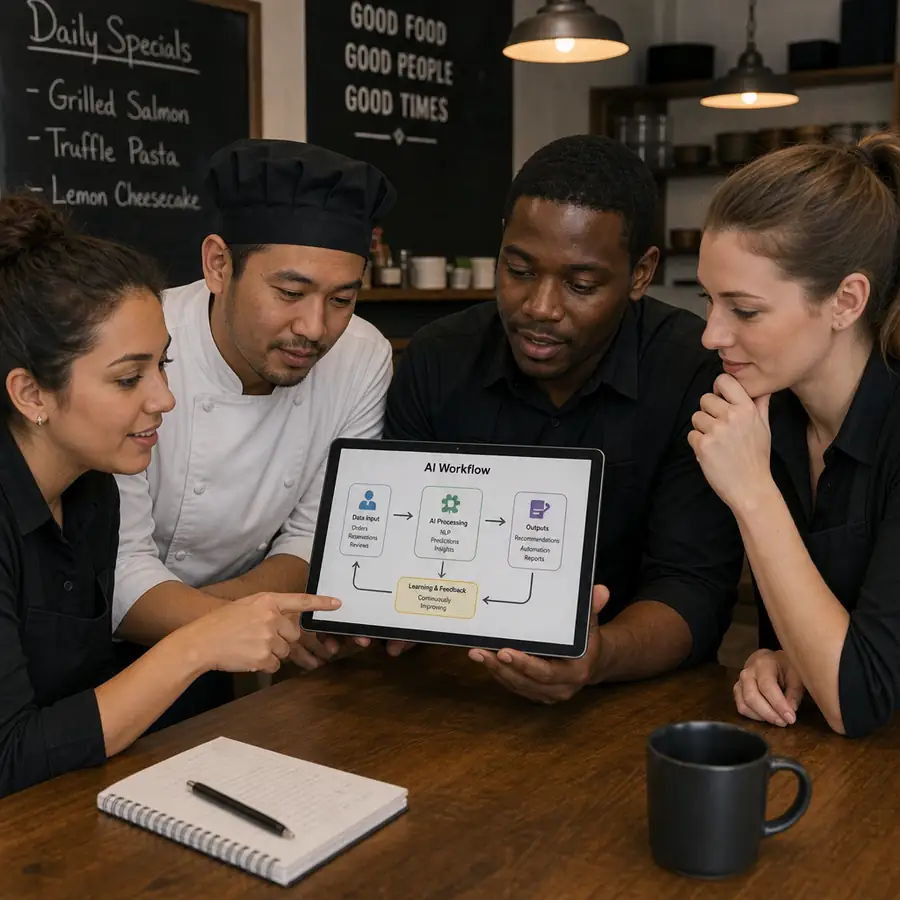
HORECA STORE: THE AI RESTAURANT PLAYBOOK
At Horeca Store, operators also use restaurant equipment and food prep equipment upgrades to support smoother automated service.
WHY THIS MATTERS
Most restaurant owners are drowning in repeat work.
Training new hires. Writing the same scripts. Answering the same DMs. Approving the same orders.
You did not open a restaurant to spend 20 hours a week on admin.
WHAT THIS PLAYBOOK DOES
This is the exact 6-step process I use to turn restaurant operations into AI scripts. The same scripts I built for
my own team and for consulting clients.
You will not need to know how to code. You will not need to buy any new software. You will only need a free
Claude account and a willingness to write things down.
WHAT YOU WILL GET BACK
Hours. Most operators who follow this save between 5 and 15 hours a week. That is one full day, every week,
given back to you.
THE HONEST LINE
Not everything can be automated. Great service still needs great people. AI is for admin, training docs,
repeat tasks and customer messages. Not for the things that actually make people come back.
What “AI Scripts” Mean for a Restaurant (and Why They Work)
AI scripts for restaurants are structured sets of instructions, messages, and decision trees that tell an AI assistant how to respond, what to ask next, and when to hand off to a human. Think of them as your restaurant’s “playbook,” turned into operational automation.
Common places AI scripts show up:
- A chatbot for restaurants that answers “Are you open?” and “Do you have gluten-free options?”
- AI ordering systems that take pickup orders and suggest add-ons
- An AI chatbot for restaurant reservations that books tables and confirms policies
- AI customer service replies for delivery issues, refunds, or special requests
- AI scripts for restaurant marketing that generate weekly promos, SMS campaigns, and review responses
- restaurant staff training scripts AI that teach new hires how to greet, upsell, and handle objections
The goal isn’t replacing people-it’s building smart restaurant solutions that reduce repetitive labor and raise consistency.
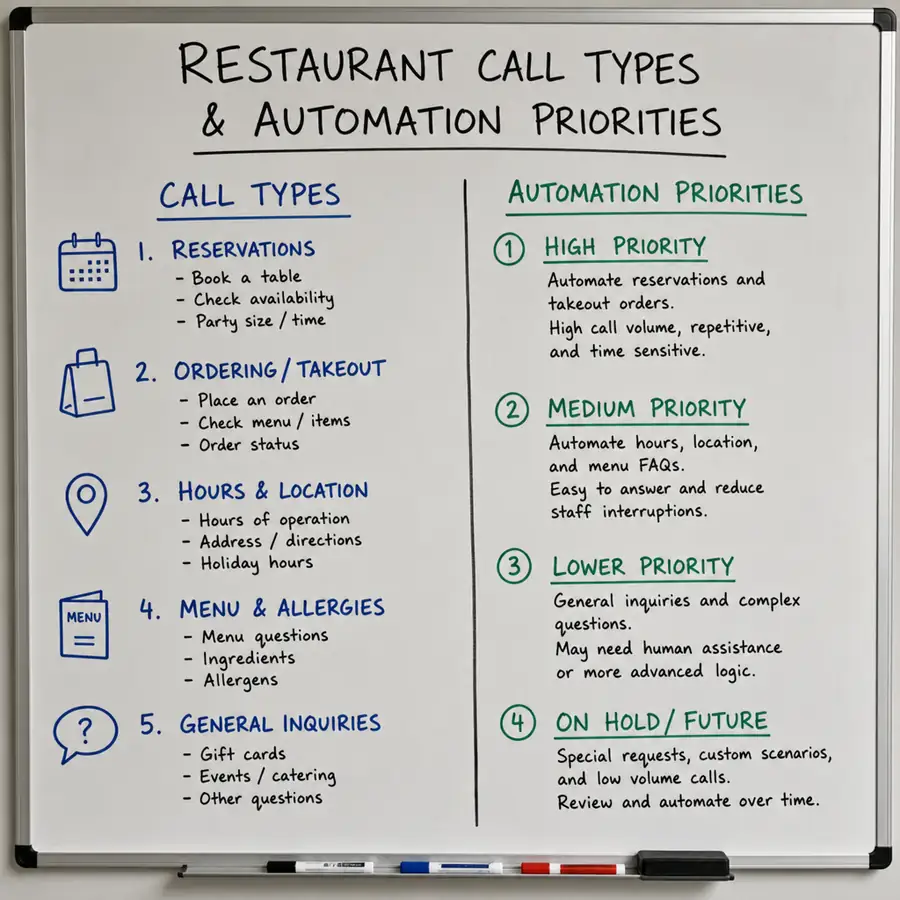
Step 1: Map Your “High-Volume Conversations” First
Before buying tools, list the interactions that happen dozens of times per day. These are your best automation candidates in any restaurant AI automation guide:
Start with these quick wins
- Opening hours, location, parking, dress code
- Reservation requests, changes, cancellations
- Waitlist and “how long is the wait?”
- Menu questions: allergens, spice level, vegetarian/vegan
- Catering inquiries and event bookings
- Order status: “Is my pickup ready?”
- Gift cards, loyalty, promotions
Create a simple table with: Question -> Best human answer -> Next question -> Outcome. That becomes the foundation for AI customer service scripts for restaurants.
Step 2: Choose the Right Restaurant Automation Tools (Stack, Not Chaos)
Most restaurants don’t need 12 new apps. You need a tight stack that fits your operation. The “best” setup depends on volume and service style, but the categories are consistent.
Core categories to evaluate
- Chat + website bot
- Your front door for FAQs, reservations, and lead capture
- Voice assistant for phone
- Critical for how to automate restaurant phone calls and stop missed revenue
- Ordering assistant
- An AI order taking system for restaurants for pickup (and sometimes delivery)
- Reservation + SMS
- Confirmations and reminders to reduce no-shows with AI reminders
- POS + data
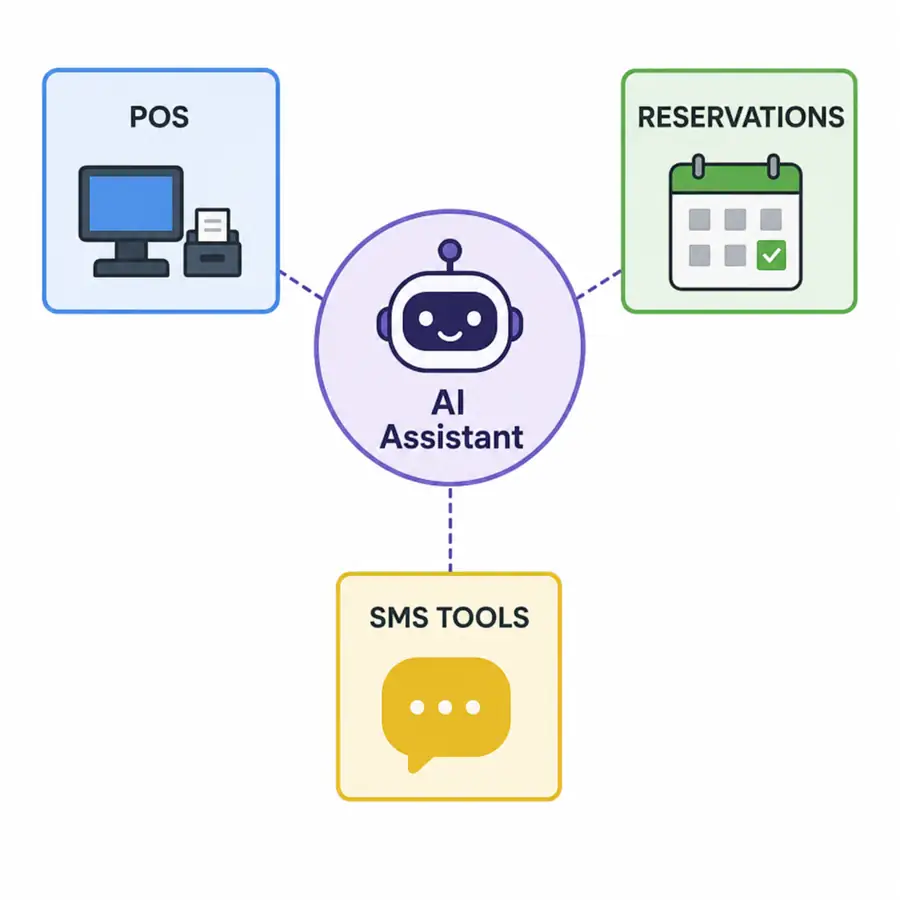
- POS integration with AI assistant for menu sync, order injection, and reporting
- Marketing assistant
- Reusable AI scripts for restaurant marketing to keep campaigns consistent
When comparing restaurant automation tools, prioritize:
- Easy menu/reservation syncing (so the AI doesn’t “hallucinate” items)
- Human handoff (text + call transfer)
- Logging/analytics (what guests ask, what converts)
- Multi-language support if relevant
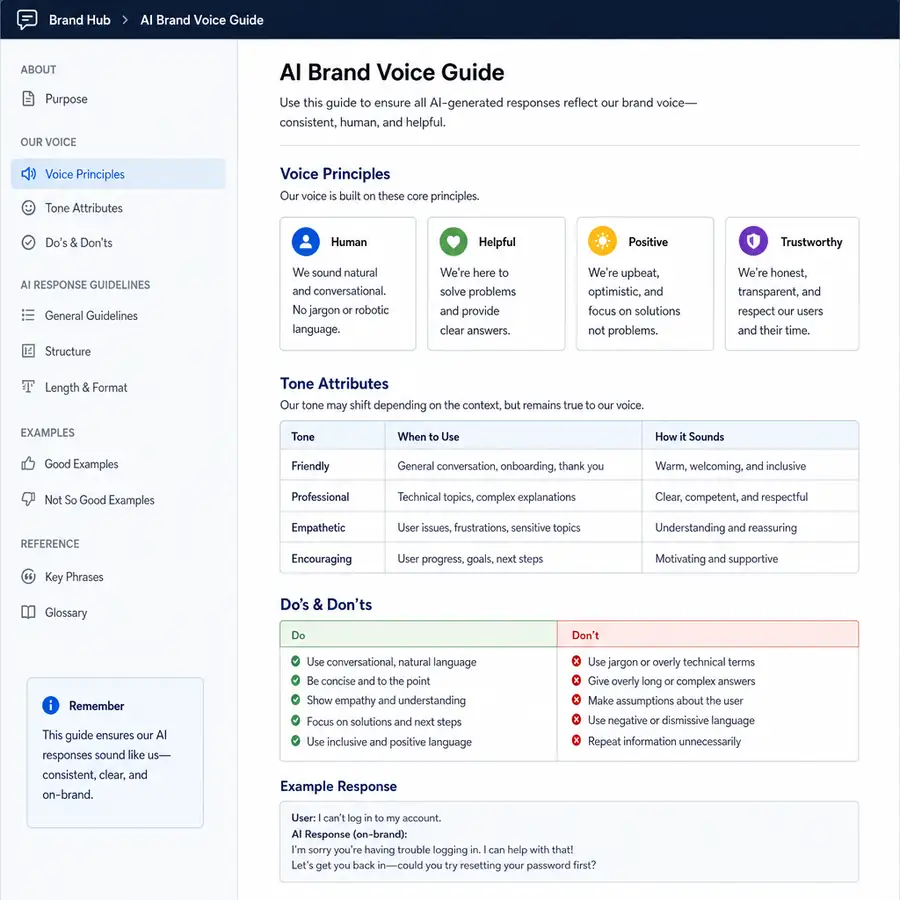
Step 3: Build Your Brand Voice into Every Script
Restaurants win on vibe. If your AI sounds generic, guests notice. Your AI scripts should include:
- Tone: “warm and quick” vs “fine-dining formal”
- Brand words: your signature phrases (e.g., “We’d love to host you”)
- Policies phrased gently: deposits, late arrivals, corkage, seating limits
- Escalation rules: when to stop and route to a manager
Example: voice + chat greeting script
- “Thanks for calling [Restaurant Name]. I can help with reservations, hours, menu questions, or pickup orders. What can I do for you today?”
That one line sets a consistent experience across a chatbot for restaurants and voice automation.
Step 4: Reservations That Actually Reduce No-Shows (Without Annoying Guests)
No-shows hurt twice: lost revenue and wasted capacity. A well-designed AI chatbot for restaurant reservations can do more than “book a table.” It can enforce rules politely and follow up automatically.
Reservation script elements that work
- Confirm party size, date/time, and seating preference
- Ask about allergies and special occasions (and tag in CRM)
- Confirm policy: late arrival window and seating time limits if needed
- Send SMS/email confirmation instantly
- Send reminders at smart intervals (example: 24 hours + 2 hours)
- Offer “modify/cancel” links to keep the experience frictionless
This is the most direct way to reduce no-shows with AI reminders while keeping your host stand calmer.
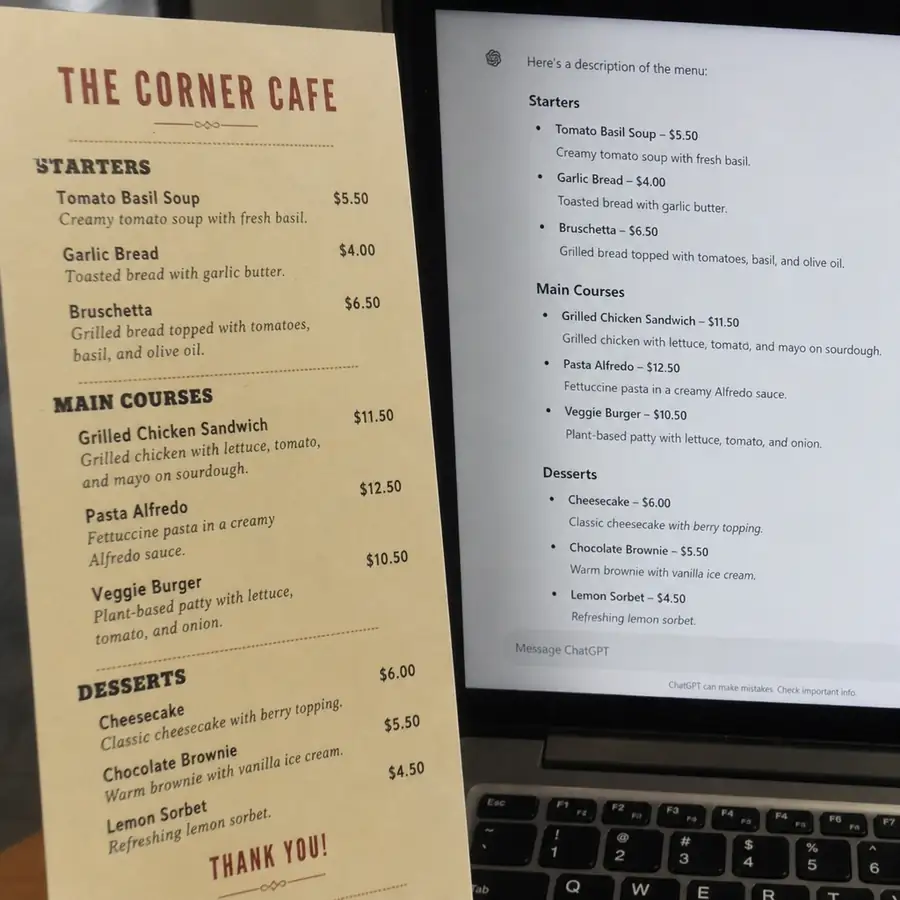
Step 5: Turn Your Menu into Conversion Copy (AI-Generated, Chef-Approved)
Strong menu engineering works even better when kitchen equipment and tableware support the dishes you promote.
Most menus undersell the food. With menu descriptions generated by AI, you can quickly create consistent, appetizing descriptions-then have the chef or GM approve.
What to include in menu-description scripts
- Ingredients + sensory words (texture, aroma, heat)
- Sourcing (local farms, house-made, dry-aged)
- Dietary tags (GF option, vegan, nut-free)
- Suggested pairing (cocktail, wine, side)
Example prompt structure (for internal use)
- “Write a 20-28 word menu description in a [tone] style. Mention cooking method, key ingredients, and a signature detail. Avoid clichés like ‘to die for.’”
This same approach powers an AI ordering system that answers “What’s your best spicy dish?” and makes confident recommendations.
Step 6: Create AI Upselling Scripts Your Team Will Actually Use
Upselling isn’t about pushing-it’s about guiding. The best AI upselling scripts for servers mirror what top performers do: suggest one relevant add-on at the right time.
High-converting upsell moments
- When guests ask for a recommendation
- When they order a popular entrée (“Would you like to add…?”)
- When they choose a cocktail (“Want to make it a double / premium spirit?”)
- Dessert and after-dinner drinks timed with check drop
Example server-style upsell script (for AI ordering or staff training)
- “Great choice. Most guests who order the [Entrée] add the [Side]-it’s our best match. Want to include it?”
These patterns can be embedded into ai scripts for restaurants used by your online ordering assistant, phone bot, or training program.
Step 7: Phone Automation Without the “Robot” Feel
Missed calls = missed sales. Automating phones is often the fastest ROI-especially for busy quick-service and high-volume casual dining.
To succeed at how to automate restaurant phone calls, your script must do three things well:
- Identify the intent quickly (reservation, order, hours, directions)
- Ask minimal questions
- Offer a fast human handoff
A simple “call triage” flow
- “Are you calling about a reservation, a pickup order, or a quick question?”
- If reservation: collect details -> confirm -> send SMS
- If order: take items -> confirm -> payment/link -> pickup time
- If “quick question”: answer from knowledge base or route to staff
With a strong call triage, your AI customer service scripts for restaurants feel like a helpful concierge, not a maze.
Step 8: Ordering Automation That Plays Nice with Your POS
Pair ordering automation with a reliable point of sale system and the right restaurant equipment so tickets stay accurate during rush.
An AI order taking system for restaurants is only as good as the data behind it. To avoid wrong items or modifiers, you need clean menu data and tight system design.
What “good” looks like
- Menu synced daily (or real-time) from POS/ordering platform
- Modifier rules enforced (required selections, max choices)
- Out-of-stock logic
- Clear order confirmation (read-back step)
- Escalation when the guest requests something unusual
This is where POS integration with AI assistant matters. It reduces manual re-entry, prevents mistakes, and lets you track what the AI sells best.
Step 9: Marketing Scripts That Keep You Consistent Every Week
Most restaurants don’t fail at marketing because of bad ideas-they fail from inconsistency. Build repeatable AI scripts for restaurant marketing so promotions go out on time, in your voice.
Scriptable marketing assets
- Weekly specials post (IG/FB + story + short caption variations)
- SMS campaign templates (limited-time offer, slow-night boost)
- Email newsletter structure (event + chef feature + reservation link)
- Review responses (positive + negative, with escalation rules)
- Google Business Profile Q&A replies
A practical approach:
- Create 5-10 “approved templates”
- Feed AI your current promos, events, and menu highlights
- Require manager approval before publishing
That’s restaurant AI automation guide discipline: automation with guardrails.
Restaurant Chatbot vs Human Receptionist: The Real Trade-Off
The restaurant chatbot vs human receptionist question is really about coverage and consistency.
Chatbot strengths
- Never misses a call or message
- Handles peak surges instantly
- Standardizes policy communication
- Captures leads (catering, events) 24/7
Human strengths
- Handles complex, emotional, or VIP situations
- Flexes when something is unusual (power outage, kitchen issue)
- Creates relationship and nuance
The best model is hybrid:
- AI handles 70-90% of repetitive requests
- Humans handle exceptions and hospitality moments
This is what mature restaurant tech innovations look like: humans elevated, not replaced.
Step 10: Train Staff Faster with AI-Driven Scripts (Without Losing Culture)
Scripted training pairs well with consistent kitchen workflows and a clear restaurant kitchen equipment setup. A great server still needs strong habits alongside automation.
New hires need reps-fast. Using restaurant staff training scripts AI, you can simulate scenarios and standardize onboarding.
Training modules to script
- Greeting and seating
- Allergy and dietary handling
- Handling “we waited too long”
- Upsell and pairing suggestions
- Phone etiquette and reservation policies
- Handling delivery mistakes (tone + steps)
Because training scripts are consistent, your brand becomes consistent-across shifts, locations, and seasons.
Troubleshooting AI Voice Bot in Restaurants (The Issues You’ll Actually See)
AI isn’t “set and forget.” If you deploy a voice bot, plan for iteration. Common issues and fixes for troubleshooting AI voice bot in restaurants:
- Guests talk over the bot
- Fix: shorter prompts, confirm after 1 question, allow interruptions
- It mishears names or times
- Fix: spell-back option, SMS confirmation, “Did you mean 7:15?”
- It books when you’re full
- Fix: real-time capacity sync with reservation system
- It offers items you no longer have
- Fix: automated menu sync and 86 logic
- It gets stuck on edge cases
- Fix: clearer escalation triggers (“Let me connect you to the team”)
Build a weekly review habit:
- Top failed intents
- Top handoff reasons
- Conversion rate for reservations and orders
Data Privacy for Restaurant AI Systems (Don’t Skip This)
Guests trust you with phone numbers, allergies, and payment flows. Data privacy for restaurant AI systems should be planned before launch, not after a complaint.
Practical safeguards:
- Collect only what you need (minimize data)
- Avoid storing full payment details unless handled by a compliant provider
- Set retention rules (auto-delete transcripts after a set period if possible)
- Role-based access (managers only for sensitive logs)
- Disclose automation where required (especially for call recording/AI handling)
- Vendor review: encryption, audit logs, and compliance posture
If you operate in multiple states, be mindful that privacy rules can vary. When in doubt, get legal guidance tailored to your operation.
A Simple 14-Day Launch Plan to Turn Your Restaurant Into AI Scripts
Use this as a practical rollout for TURN YOUR RESTAURANT INTO AI SCRIPTS without overwhelming the team.
Days 1-3: Define and collect
- List top 30 guest questions
- Write your “best human answers”
- Decide tone, policies, and escalation rules
Days 4-7: Build and connect
- Implement chatbot + reservation flow
- Add SMS confirmations and reminders
- Set up ordering flow if applicable
- Start POS/reservation syncing (POS integration with AI assistant)
Days 8-10: Test like a guest
- Run 50+ test chats/calls
- Break it on purpose (edge cases)
- Add handoff rules
Days 11-14: Launch + optimize
- Go live during a manageable window
- Monitor transcripts daily
- Update scripts weekly
This keeps your ai customer service reliable from day one.
Takeaway: Automation Is a Scripted Hospitality System
The best restaurants don’t just “add AI.” They systematize what great hospitality already is-clear answers, consistent tone, and fast follow-through-then scale it.
When you TURN YOUR RESTAURANT INTO AI SCRIPTS, you’re building a repeatable operating layer across reservations, ordering, service, and marketing. Start small, connect it to your real data, review performance weekly, and keep humans in the loop for the moments that matter most.
Complete Your Restaurant Setup with The Horeca Store
Building a modern, efficient, and customer-focused restaurant is about more than adopting new technology and AI solutions. You also need dependable, high-quality products and supplies to support everyday food preparation, serving, takeaway, packaging, and customer service. The Horeca Store offers a wide selection of foodservice essentials, including disposable food containers, takeaway cups, coffee cups, disposable cutlery, napkins, food packaging, and other catering supplies. These practical products can help restaurants maintain smooth operations while providing customers with convenient and professional food and beverage service.
Whether you're running a restaurant, café, bakery, food truck, hotel, catering company, or takeaway and delivery business, having reliable foodservice supplies readily available can help keep your daily operations organized, efficient, and professional. From safely packaging freshly prepared meals and desserts to serving hot and cold beverages, takeaway orders, and catering requirements, the right supplies can make a noticeable difference in your service. Explore The Horeca Store for quality hospitality, takeaway, and catering products designed to support your restaurant's everyday needs and help create a better experience for your customers.